Introducing Opine SQL: Turn sales pipeline data into action without the spreadsheet cycle

If you run RevOps, sales, or SE at a growing company, you know this loop. Someone needs deal-level data for a forecast, a pipeline review, or a board update. You pull a CSV from the CRM, open it in a spreadsheet, and start rebuilding the logic. Filters, joins, aggregations, all done by hand. The next week, the same request comes in, and you do it again.
Even when the exports exist, they're ad-hoc. One spreadsheet for MRR, another for pipeline by stage, another for activity counts by rep. Each one is a snapshot built by someone who knows enough SQL or Excel to get it done once. The moment the underlying data changes, the spreadsheet is stale, and the cycle starts over.
The problem isn't the ask. It's the process that follows. CSVs get pulled, logic gets rebuilt, and by the time the report lands, half the data has changed. Over time, this creates a patchwork of one-off spreadsheets that no one fully trusts and everyone spends hours updating.
That's why we're launching Opine SQL.
What Opine SQL gives you
Opine SQL is a SQL interface to your Opine analytics data and the foundation for exporting data Pipeline, evaluations, accounts, tickets, team activity, all queryable in one place. If you can write a SELECT statement, you can use it. If you'd rather not, you don't have to.
You can run a query in three places, and they all share the same query language, the same tables, and the same access controls. If you’re an Opine customer, here’s where you can do it with Opine SQL.
- The in-product editor. Open it from Insights → Opine SQL. You get a schema browser, syntax checking, query history, and a built-in natural language assistant called Opine SQL AI.
- Opine MCP. Connect Claude, Cursor, ChatGPT, or any other MCP client to your Opine workspace and ask questions in plain English. The model uses the Opine SQL tools to query your data on your behalf.
- The public API. Run queries from your own tools, scripts, scheduled jobs, or BI platforms over HTTPS using an API key.
On top of that, scheduled Data Export jobs let you take any Opine SQL query and ship the results to bucket storage on a cadence you choose, in CSV, JSON, or Parquet, to an Opine-managed bucket or your own AWS S3, Microsoft Azure, or Google Cloud Storage bucket.
Define your logic once. Ship it where your team already works automatically.
Opine SQL AI: write queries in plain English
If you'd rather describe what you want than write the SQL yourself, the in-product editor includes Opine SQL AI. You no longer need to know SQL, or wait on someone who does. Ask in plain English and get a working query back in seconds.
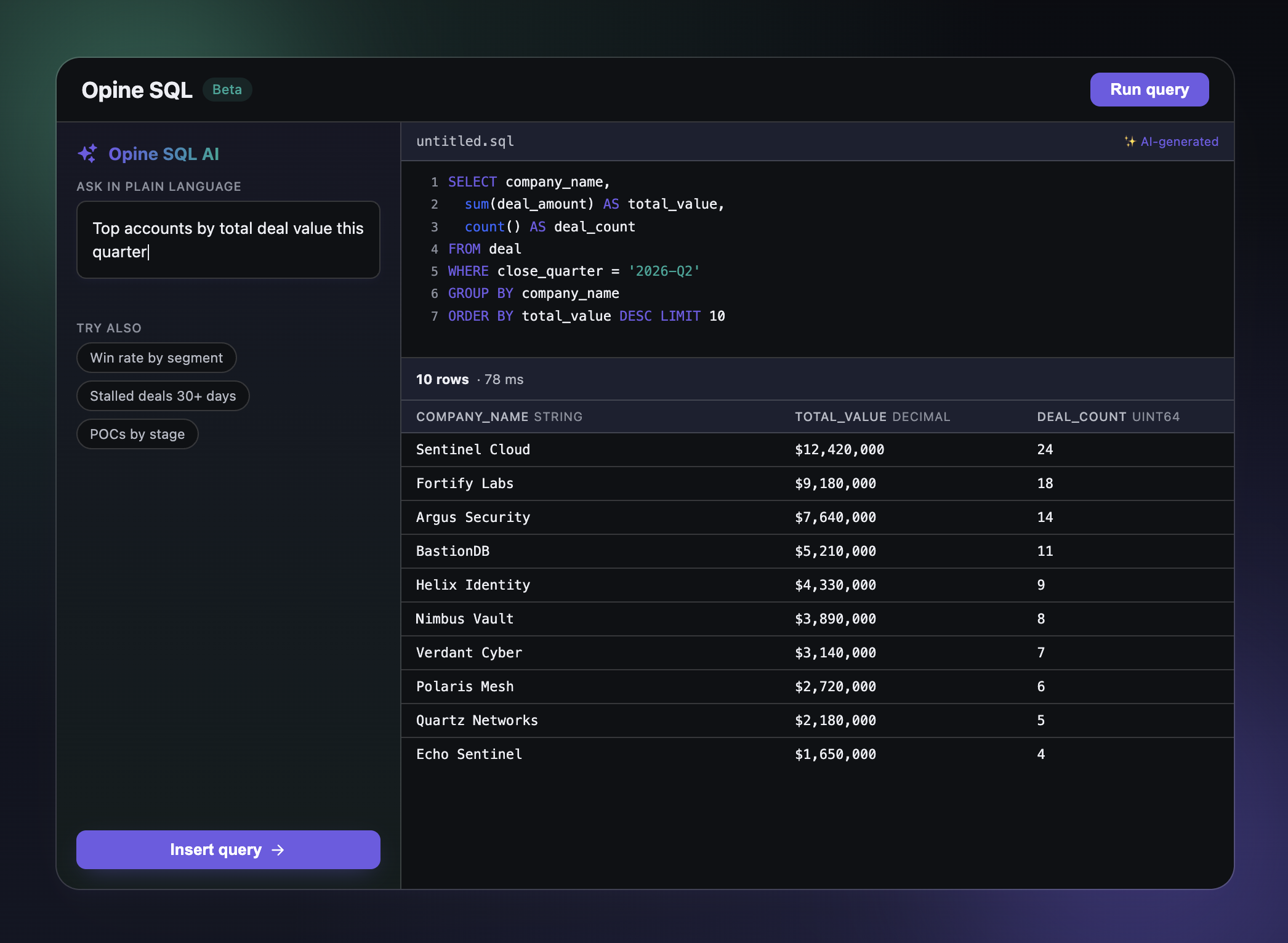
Open the side panel and ask for what you need. Open deal count by stage, weekly closed-won pipeline by owner this quarter or deals with no activity in the last two weeks.
The Opine assistant inspects the relevant tables, builds a query, validates it, and shows you the SQL alongside an explanation of what it does. Hit Accept & Insert to drop it into the editor, then run it, tweak it, or save it. You can iterate in the same panel: split by pipeline too, add deal totals, limit to the Enterprise team, and the assistant updates the query using the prior conversation as context.
Opine SQL AI uses the same access controls as the rest of the product. It cannot generate a query that returns data you don't have access to.
What can you do with Opine SQL?
Here are some of the ways teams are already using Opine SQL.
Weekly pipeline reports. Schedule a CSV of your Opine pipeline data to land in your reporting tool every Monday morning. No manual exports, no stale spreadsheets, same logic every week.
Deal risk alerts for SE teams. Export deals flagged with engagement drops or competitive signals to a shared folder or Slack channel. SE leaders get visibility into at-risk deals without digging into Opine daily.
Forecast data in your warehouse. Push Opine-enriched deal data into Snowflake, Databricks, or your BI tool on a daily schedule. Your forecast models now include Opine's deal health signals alongside CRM and product usage data.
Account engagement snapshots for GTM teams. Schedule weekly exports of account-level engagement to marketing or customer success. They see which accounts are showing buying signals without needing access to Opine.
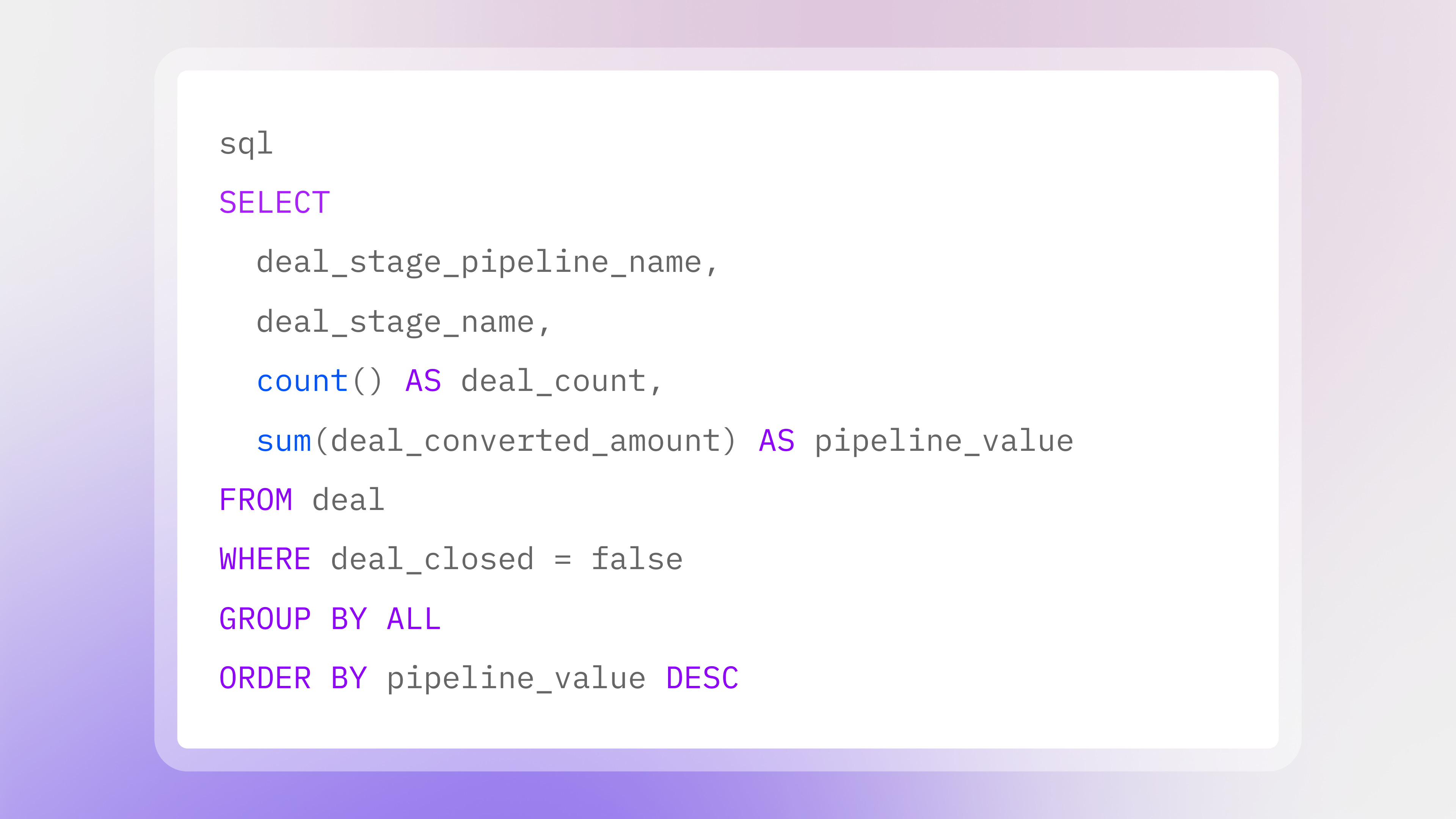
Pipeline health at a glance. A query like this answers where is the pipeline sitting today in one shot:
The deal table already includes denormalized company, stage, and evaluation columns, so most analytical questions need no JOINs.
Pipeline changes over time. Snapshot tables give you a consistent view of now. History tables let you track how pipeline and deal state changed over time. Compare start-of-quarter to end-of-quarter, replay how a deal moved through stages, or feed time-series tables in your warehouse.
Win rate by segment. Slice win rate by pipeline, owner, lead source, or any custom property without exporting anything to Excel.
Smarter context for Opine's Pipeline Agents
Opine SQL also feeds Opine's Revenue Agents. Agents already use deal context to surface insights, but Opine SQL gives them a cleaner data layer to work from.
Pre-processed context: Instead of agents working off noisy raw data, Opine SQL acts as the brain that feeds them. The data is processed and cleaned first, so when an agent makes a recommendation, it's based on accurate information.
Scheduled freshness: Scheduled exports keep agents working off the most recent data, reflecting your latest query logic and deal movements.
Unified business logic: Whether a human is reading a report or an agent is triggering an automation, both are working from the same governed definition of your pipeline.
Cross-system alignment through MCP: MCP integrations push the intelligence gathered by agents into other tools in your stack. The same SQL surface that powers your reports now powers your CRM updates, Slack alerts, and help desk tickets.
Scheduled exports: data where you need it
Every export starts with your SQL. You choose the rows and columns, the output format (CSV, JSON, or Parquet), the file naming pattern, the destination storage path, and how often the job runs.
Each scheduled run lands in its own timestamped folder. This makes it easier to replay historical runs, track which export produced which rows, and build incremental ingestion pipelines without guessing what changed.
You can send results to a secure bucket managed by Opine, which is the fastest path to getting started because it requires no storage setup or credentials. Teams that want tighter control can export directly to their own cloud storage:
- AWS S3 bucket via an IAM role you control, no long-lived access keys.
- Azure Blob Storage bucket via a storage account connection string.
- Google Cloud Storage bucket via HMAC credentials through the S3-compatible interoperability path.
- S3-compatible bucket via access key and secret.
This gives teams the flexibility to keep data inside their own cloud account, land files in a bucket their warehouse already reads from, or align with internal security requirements.
From Settings → Data Export, you can create jobs, review the latest run status, test connections, trigger runs on demand, and inspect run history from one place.
One governed data surface
Opine SQL is read-only by design. Only SELECT is allowed. Every query is scoped to your organization. API keys carry scopes. The AI assistant can't generate queries that return data the caller doesn't have access to. Result sets and date ranges are capped to keep queries fast and predictable.
- Whether the query runs in the editor, through MCP, through the public API, or as a scheduled export, it's the same logic, the same access controls, and the same numbers everyone in the org sees.
Get started
If your team already has access, you can start writing queries and scheduling exports today.
- Open the editor at Insights → Opine SQL and run your first query.
- Try Opine SQL AI in the side panel for natural language queries.
- Connect your AI agent to https://app.tryopine.com/mcp in Claude, Cursor, or any MCP-compatible client.
- Generate an API key in workspace settings to use Opine SQL from your scripts and BI tools.
- Schedule an export under Settings → Data Export to ship query results to your warehouse on a cadence.
For documentation, syntax guides, and example queries, visit the Opine SQL documentation.
If you're ready to get started, reach out to your Opine contact or email support@tryopine.com.
Get the latest in your inbox
Get weekly tips & strategies from your friends at Opine to close faster, reduce risk, and grow revenue.
Recent articles
Explore the Opine archive of blog articles on presales, sales, and customer success automation. From strategies, best practices, to angentic AI-driven revenue growth, you'll find it here.
.png)

.png)